What's new in Factbird?
Stay up to date with the latest improvements, features, and fixes in Factbird.
Want to receive release updates by email?
v1.548.13
New features
- Operator View
- Multi-line management in Operator View: Users can now select a directory to view and monitor multiple production lines simultaneously in a single view.
Improvements
- Added automatic draft saving for activity templates to prevent accidental loss of work. When creating or editing an activity template, your changes are now automatically saved to your browser's local storage. If you accidentally close your browser, navigate away, or your session ends unexpectedly, your work won't be lost.
- When “Current shift” is selected in Operator View, a production meter chart is now displayed on the main view. The stop registration chart remains accessible through the stop registration dialog, which opens when clicking the Stop Notification banner.
Bug fixes
- Fixed a bug where all peripherals were not shown in the Organization Hierarchy dialog when adding sensors.
- Fixed the OEE percentage showing through the hierarchy dropdown.
- Fixed a bug where a long template with an instructions field would jump to the middle of the template.
- Stop descriptions now appear in tooltips when hovering over registered stops in Operator View.
v1.543.9
New features
- Operator View
- Manual Counter and OEE are now available in the Operator View.
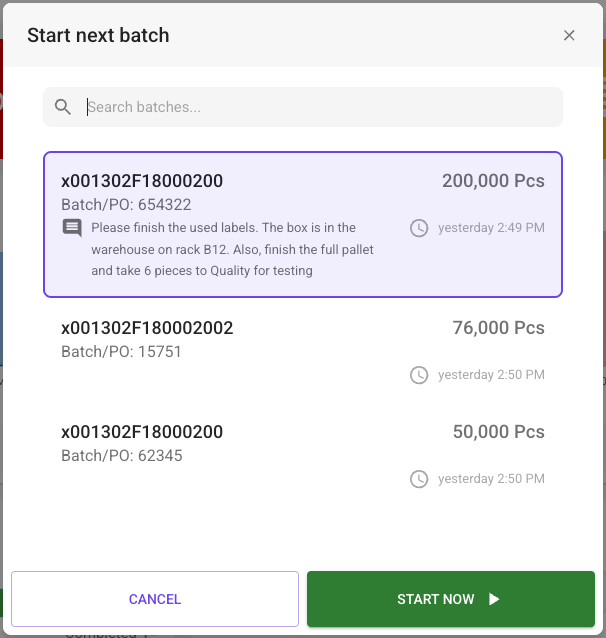
- Batch comments are now visible in the Operator View. Users can view comments for the running batch by clicking the info icon on the batch card, and the comments also appear in the Next batch list dialog.
Improvements
- GraphQL API
- Documentation clarifies which type of ID is expected by
archivePeripheralandperipheralByID.
- Documentation clarifies which type of ID is expected by
- Other
- Added the ability to edit registration in the multi-select dialog in Operator View.
- Administration page: Moved the Add button to the bottom-right corner to prevent it from covering page navigation.
- Fixed a regression that caused peripherals without descriptions, when created through the API, to produce errors.
Bug fixes
- Organization Hierarchy: Fixed a bug where, after moving a Node to a Directory, the Node would disappear.
- Fixed a bug where the OEE card wasn't shown in the Operator View if no main OEE type was configured for the Line. The application now defaults to showing OEE1 if no main type is set.
- Fixed a bug where the hourly count displayed incorrect stop durations in some time zones.
- Fixed a bug where the Operator View and Batch tab displayed different values for batch ETC.
- Activities: Fixed a bug where the Batch filter remained stuck in the loading state after selecting a location.
- Fixed a bug where the
indicesargument was ignored fordevice.sensorsanddevice.peripheralsresolvers. - Fixed a bug in the Operator View where starting a batch would start the first batch in the list instead of the batch selected by the user.
v1.530.6
New features
Improvements
- Factory overview
- OEE calculation with speed loss and scrap loss - The OEE displayed on the organization page also known as the factory overview now includes speed loss and scrap loss of the lines that have its inclusion enabled in their OEE settings.
- 💡 Note to customers
You might see a directory or a line with OEE higher than 100% if the associated line(s) are incorrectly configured with a validated and expected speed below the speed the line actually runs at. Please increase the expected and validated speed appropriately in the main sensor settings of the line. This change will only affect how future data is displayed so it might take some time until the OEE on the factory overview falls to a correct value depending on the selected time period. If you need to adjust the speeds retrospectively to get more accurate reporting data you can set the speeds on a batch as a workaround described in this article. - Andon
- Added a timezone selector to the Andon shift. This is done to fix an issue where Daylight Saving Time would cause the entire schedule to shift one hour. Making the schedule aware of timezones allows it to take Daylight Saving Time into account when calculating shifts.
- Show descriptive error message when andon role deletion fails.
- Sensor setting
- Show descriptive helper text on Main Sensor Settings dialog, if the Update button is disabled.
- Support
- Added support for Portuguese language.
Bug fixes
- Fixed an issue where it was not possible to create Action plans or switch between line nodes if you navigated to a line through Organization.
- Only users with Manage Activities permission can navigate to template editing from Activity log.
- Fix batch card progress bar showing through the hierarchy dropdown on Operator View.
- Fixes an issue where duplicating activities would throw an error.
- 'Produced this week' and 'Produced since yesterday' in the Line Overview are no longer shown with decimals.
- Fixes an issue where the "Recent shifts" selector would select the wrong time range if the shift schedule had different timezone than the user.
- Fix a case where overrides were not applied correctly if the time-range was fully covered by overrides.
- Fixes uptime KPI calculation bug where ongoing shifts with future end times would show inflated uptime values.
v1.524.0
New features
- Factory overview
- Users can now select between OEE1, OEE2, OEE3 and TCU to be shown on the line and directory cards visible in the factory overview. The card settings are available to default super users from the three dot menu in the top right corner of the factory overview.
Improvements
- Manual process line
- Comments and initials are now shown when you hover over a registered stop in Register Stops on a Manual Process line.
Bug fixes
- Line
- Fixed a bug where Line schedule configured from Sunday to Monday of the next week would not appear for some timezones.
- Enabled zooming in on the chart of manual lines (lines with manually entered downtime).
- Organization hierarchy
- Fixed a bug where hierarchy was not fully loaded on organization admin page.
- Fixed a bug where a node could not be deleted immediately after moving the last child node out of it.
- Activities
- Activity report for stop registration triggered activities now shows comment and initials for the stop registration.
- Fix eda bug where activities would have blank fields when using the export function.
- Other
- Fixed a bug where stop selection in the Operator View would break if the "subtract cycle time" option is on.
- Fixed a bug where users would not show up in ‘Add User Dialog’ if name contained trailing whitespace. User names are now trimmed for trailing or leading whitespace before storing them.
- Fixed a bug where a missing permissions tooltip would be displayed when adding/editing StopCauseCategories.
- Fixed a bug where it was not possible to update a "Measurement" type sensor because the button was disabled.
- Fixed a bug where current batch would be suggested as next batch during stop registration batch changeover.
- Fixed a bug where the ‘Create’ action plan dialog used the wrong url for the associated data.
v1.516.1
New features
Improvements
Cloud infrastructure maintenance and dependency updates.
Bug fixes
v1.514.3
New features
Webhooks is now released and generally available for all customers in the beta testing phase. This feature allows Factbird to automatically send event data to external endpoints when events occur, enabling real-time synchronization and workflow automation.
Improvements
Bug fixes
- Administration
- Fixed a bug in the Administration page where the number of users per role was incorrect.
- It’s now possible to merge stops if you have the Merge Stops permission. Previously, the Manipulate Data permission was also required to merge stops.
v1.512.3
New features
Improvements
Bug fixes
- Lines overview
- Fixed a bug where not all lines would show up in the search results on the lines overview page.
- Hourly count
- A value of 0 can now be entered into scrap and rework in Hourly Count.
- User administration
- Fixed an issue where the ManualCount permission did not work as expected.
- Activity dialog
- Fixed an issue with field values not being shown in the activity dialog on the reporting page.
v1.511.0
New features
Operator View is now available for all customers.
.webp)
This is a brand new interface designed specifically for operators on the shop floor. It brings all operator needs into one simple view, from logging stops and managing tasks to tracking batches and line performance in real time.
With its clear, intuitive design, operators can act in just a few clicks, stay focused on production, and provide more reliable data for managers and leaders.
- AI-generated templates for Activities are now available.
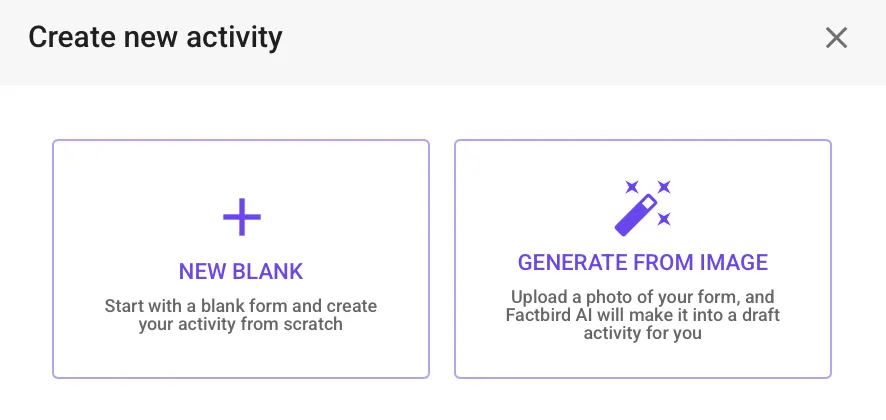
We’re introducing a faster way to create activities! With AI-generated templates for activities, you can now upload an image of any existing form, and Factbird’s AI will automatically generate a draft activity for you.
Improvements
- Organization Administration
- The organization hierarchy editor in the administration page has received a few improvements with a focus on user experience.
- User Administration
- User management related inputs are now disabled for companies that manage their users via an external identity provider, IdP. For example, buttons in Factbird for creating, enabling, and disabling users are now disabled when users are managed through Active Directory in Microsoft.
- Other
- The color of the buttons for manual rework registration has been changed from green to yellow to signal units that need to be re-tested and not necessarily good parts.
Bug fixes
- Form errors are now correctly reported in the stop registration dialog if inputs don’t pass validation.
- Fixed a bug where fields from different activities were mixed up when displaying the form or the completed activity. This would happen when one activity was duplicated from another or when multiple instances of the same activity were listed but the activity had been modified in between them.
- Fixed a bug where the redirect between the Shift dashboard and the Register Stops tab entered an infinite loop.
- Fixed a permission issue for devices.
- Fixed a bug on the Update override dialog where the user couldn't save without commenting.
- Fixed the helper text on the Stops tab on "Main Sensor Settings" dialog.
- Fixed a bug where duplicating an activity would use the same form fields as the existing activity, which could lead to wrong custom form fields being shown.
- When a time period extending into the future is selected (e.g. a current shift), the line KPIs no longer include time in the future and are only calculated on the available recorded production data.
v1.499.7
New features
- Hourly count overview
- Scrap and rework can now be entered for manual counters in Hourly Count. If a line has manual scrap or rework, a new column will automatically be shown in the table where manual data can be entered.
Improvements
Bug fixes
- Sensor settings
- Fixed an issue with an error message appearing when trying to update sensor settings for a Factbird Duo.
- Fixed an issue where it was not possible to update the sensor settings.
v1.495.11
New features
Improvements
- GraphQL API
- Documentation clarifies what kind of line ID is returned in the
Batchtype. - The descendants of a
Nodeare ordered first by depth and second by UUID. - The documentation for the
Linetype now states what kind of ID thatmain_peripheral_idis. - Previously the documentation for
NodeIdandPeripheralIdwould not render words enclosed with chevrons. For instance, the sentenceFormat: <uuid>-<index>would be rendered asFormat: -. This will now be rendered asFormat: {uuid}-{index}.
- Documentation clarifies what kind of line ID is returned in the
- Other
- When adding groups to sensor set up, the group role name is now displayed in dialog.
- Line status is now determined while disregarding micro-stops.
Bug fixes
- UI
- Fixed a field ordering bug on control recipes.
- Fixed issues in the Trends tab where the wrong dates would be displayed, and it was not possible to enable specific dates after disabling them.
- Widened the changeover input fields in the stop registration dialog to show the full batch information.
- Activities are now shown in Register stops, even if a secondary sensor on the line is selected.
- Other
- Fixed a bug where newly created virtual sensors would miss counts.
- Line status should no longer show “0 seconds - running” sometimes, even though the line is stopped.