Factbird MCP: connect your production data to Claude, ChatGPT, and Copilot
Connect Claude, ChatGPT, or any AI tool your team already uses straight to your real production data, and get answers instead of guesses.


Factbird MCP connects your live production data to the AI tools your team already uses, including Claude, ChatGPT, Microsoft Copilot, and Google Antigravity 2.0. Once it’s connected, you can ask about your lines in plain language and get answers built on current data from your sensors and PLCs. The connection is read-only, follows your existing Factbird permissions, and takes just minutes to set up.
What is MCP, and what does Factbird MCP do?
MCP stands for Model Context Protocol. It’s an open standard, introduced by Anthropic in 2024, that gives AI assistants a shared way to connect to outside data sources and tools. Before MCP, every connection between an AI tool and a data system was custom work. With MCP, a data source publishes one connection, and any compatible AI tool can use it.
Factbird MCP is that connection on our side. It makes Factbird a data source any MCP-compatible AI assistant can query directly, so the AI tool your team has open can read your production data and reason over it.
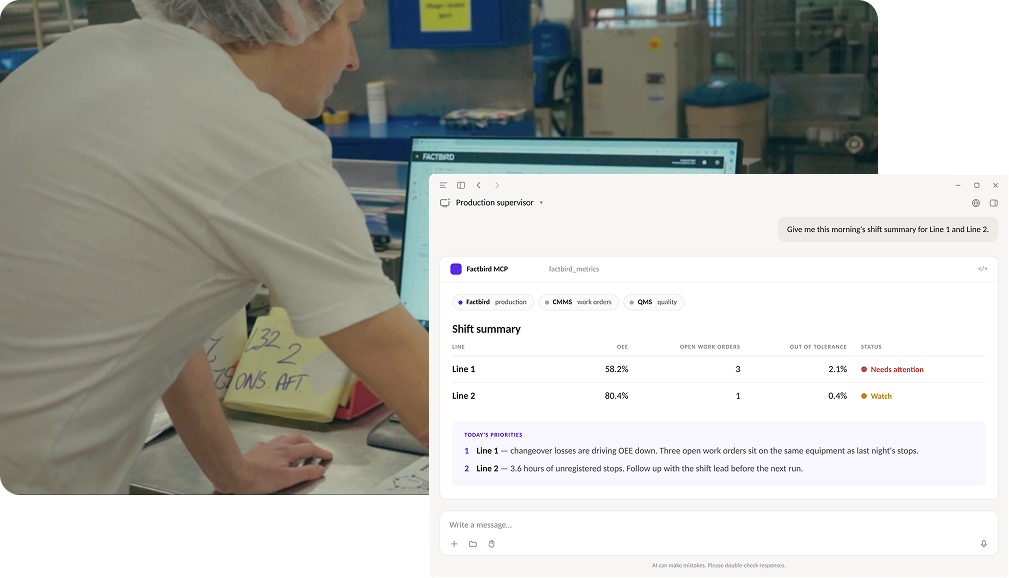
That changes what a question about your factory looks like. Until now, “why was OEE down on Line 3 this morning?” meant opening Factbird, finding the right dashboard, and reading the stop causes yourself. Or messaging someone who would. Now you ask the AI assistant you already use, and it does the looking.

What can you ask Factbird MCP?
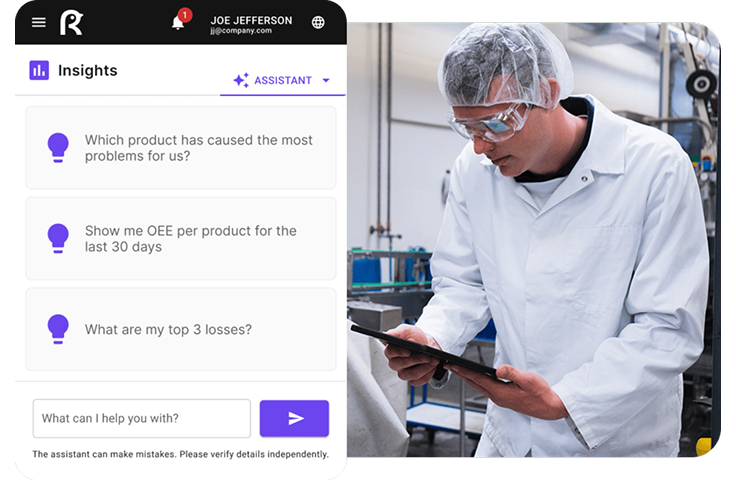
Anything you could find in Factbird yourself, phrased the way you’d ask a colleague. These are a few examples from early use:
- "Why was OEE down on Line 3 this morning?"
- "Which stop cause cost us the most hours last week, across all lines?"
- "Compare changeover times on the two fillers over the last 30 days."
- "Slice that by product." (Follow-ups work in the same chat.)
- "Are we on track to hit the delivery dates we promised this month?" (With your ERP connected too.)
- "Draft a shift handover note from the last eight hours on Packaging."
The answer comes from an AI agent, which means an AI assistant that can take actions on its own, in this case querying Factbird. It calls Factbird for data, reads what comes back, decides what to look at next, and keeps going until it has an answer it can stand behind. If the first query shows a run of micro-stops, it pulls the stop causes. If the stop causes point to one machine, it pulls that machine’s history. You see the finished analysis.
And because the assistant can connect to other systems through MCP too, it can put your production data next to your ERP, maintenance log, or quality records and reason across all of them. The analysis you need no longer has to exist as a pre-built report.
Depending on your AI tool, you can also ask for the answer to be delivered as an Excel sheet or a PowerPoint slide, or set the question to run on a schedule. A daily OEE digest in your inbox before the morning meeting is a five-minute setup in Claude or ChatGPT.
How does Factbird MCP work?
Three steps, and the first one is already done if you run Factbird today.
- Your lines feed Factbird. Sensors and PLCs send live production data into a system built to be hardware-agnostic and running within days of install.
- You add Factbird MCP to your AI tool. In Claude, ChatGPT, or Copilot, add the connection using the Factbird MCP URL (api.cloud.factbird.com/mcp), then sign in with your Factbird account and click “allow.” (Our setup guide covers each tool.)
- You ask questions. The AI assistant queries Factbird on your behalf and answers using your actual production data.
No data engineer, no middleware, and no integration project. Wiring a BI tool into production data typically takes weeks of scoping and build, plus upkeep every time something upstream changes. This takes a few minutes.
What does Factbird MCP cost?
If your company already pays for Claude, ChatGPT, or Copilot seats, Factbird MCP puts that spend to work on the factory floor. Most plant managers and operations directors we talk to have people on their teams with an AI license already, signed under a company-wide agreement for reasons that had nothing to do with manufacturing. Until now, none of that touched production.
Factbird MCP uses those seats. No new subscription, and no new seat to buy. Factbird MCP is included in your Factbird plan at no extra cost, so the only thing standing between your team and the connection is a few minutes of setup.
The bigger saving is daily. A question that used to mean messaging someone for a report, waiting, and following up now gets answered in one conversation, by the person who had the question.
Is it safe to connect an AI tool to production data?
This is the first thing a security reviewer will ask, so here is what you’re giving access to:
- Read-only access. No AI assistant can change your data, your settings, or your line configuration through this connection. It can look at everything and touch nothing.
- Your existing permissions apply. Someone sees through their AI tool exactly what they’d see logged into Factbird directly, and nothing more.
- Sign-in is your Factbird login. Each person connects through OAuth with their own Factbird account and has to click “allow” before anything flows.
- An open standard, with no lock-in. If your team switches AI assistants next year, the connection to your data comes with you.
- Data handling. Once an AI tool has read your data, that tool’s own data terms apply. Factbird MCP runs inside the AI subscription your company already has, so the data stays under whatever agreement you signed with that vendor, and Factbird adds no new data flow on top.
We made the connection read-only on purpose. On a factory floor, analysis with no write access is the right trade, and we’d rather make it before anyone has to ask. The same goes for rollout: connecting Factbird MCP across a company requires administrator access to your AI tool’s workspace, so nobody can wire production data into an assistant without IT knowing.
How Factbird MCP fits the system of action
Our vision is that every factory should be an intelligent factory, and that shouldn’t depend on the size of the analytics team. The mechanism is what we call the system of action for manufacturing: capture the data, turn it into something a person can act on, and prove the result in numbers a plant manager can defend upstairs.
Factbird’s AI does a lot of that work inside the product. The AI assistant answers plain-language questions about your production from your real data. The AI Visual Counter tracks processes a standard sensor can’t see, counting accurately and flagging issues as they happen. The AI Activity Creator turns paper checklists into digital forms in minutes. And Report Builder with AI turns a plain-English request into a finished report.
Each of those is AI working inside Factbird, on your data. Factbird MCP points the same capability outward, into whichever AI tool your team has open.
Frequently asked questions
What is Factbird MCP?
Factbird MCP is a Model Context Protocol connection that lets AI assistants such as Claude, ChatGPT, and Microsoft Copilot query your Factbird production data directly. You ask questions in plain language, and the assistant answers using live data from your lines. Access is read-only and follows your existing Factbird permissions.
Which AI tools work with Factbird MCP?
Any AI assistant that supports the Model Context Protocol, including Claude, ChatGPT, Microsoft Copilot, and Google Antigravity 2.0. Plan requirements differ by tool; the setup guide lists them. Because MCP is an open standard, new tools that adopt it will work too, and switching assistants doesn’t mean rebuilding the connection to your data.
Can an AI assistant change my production data through MCP?
No. Factbird MCP is read-only. An AI assistant can query data, run analysis, and draft reports, but it cannot edit data, settings, or line configuration. Users also see only what their Factbird permissions already allow.
Do I need a new subscription to use Factbird MCP?
No. Factbird MCP is included in every Factbird plan at no extra cost. You need an active Factbird account and a seat on an MCP-compatible AI tool, which many companies already have through a company-wide agreement. Contact Factbird to enable MCP on your account.
How long does it take to set up Factbird MCP?
A few minutes. You add the Factbird connection in your AI tool and sign in with your Factbird account. There’s no middleware to install and no integration project, because your production data is already flowing into Factbird.
Getting started with Factbird MCP
Connecting Factbird to your AI assistant takes less time than reading this article. Reach out to your Factbird contact or get in touch, and we’ll connect you.