What's new in Factbird?
Stay up to date with the latest improvements, features, and fixes in Factbird.
Want to receive release updates by email?
v1.581.7
v1.581.7
New features
Connected Operations
- "No validation" bar in the Activities Reporting bar chart.
Improvements
Connected Operations
- The line status cause and duration now account for stop time that has been registered.
Bug fixes
- Fixed a bug where activities passing status would default to failing even though no validation rules were set. Applies to activities table and activities exporting.
- Andon comment area will display the character limit.
- Fixed a bug where manual scrap from batches would be too high.
- Fixed a bug where entering manual scrap on a batch could result in wrong scrap loss and scrap KPI values
v1.578.24
v1.578.24
New features
Improvements
Bug fixes
- Fixed an issue where OEE numbers would be wrong if there were batches that were not fully contained in your selected time range.
v1.575.23
v1.575.23
New features
Improvements
- Production Insights
- AI Assistant: Replace the default prompt with help text on howto use the Assistant
Bug fixes
- Fixed an issue where activities were not being created
v1.572.4
v1.572.4
New features
- Connected Operations
- You can now view the version history of your activity templates
Improvements
Bug fixes
v1.565.0
v1.565.0
New features
Improvements
Bug fixes
- Fixed a bug where the multi-line view in Operator View was not refreshing.
v1.559.33-v1.563.31
v1.559.33-v1.563.31
New features
- Operator View
- In the Create New Batch dialog in the Operator View, product item numbers are now visible in the product dropdown menu.
- Connected Operations
- Batch event triggers in Activities can now be configured using product-specific and packaging-specific conditions.
Improvements
- Connected Operations
- A “Product name” column has been added to the Activity export file in Reporting.
Bug fixes
- Fixed a bug in the shift calendar where scrolling through weeks would cause the calendar to display shifts that should not be there.
- Fixed a bug in the shift calendar where a shift that spans across two weeks (e.g., from Sunday to Monday) would be incorrectly shown in the second week.
v1.551.16-v1.559.33
v1.551.16-v1.559.33
New features
- Production Insights
- New KPI: "Mean time between stoppages" has been added.
Improvements
- Production Insights
- Translation management for stop cause category names has been added.
- Connected Operations
- Users can now enable or disable activity templates. Disabled activities do not fire triggers, but they remain visible in the list, greyed out. They can be re-enabled at any time, which automatically restores all original behavior.
- The Activity list now includes a Trigger column.
Bug fixes
- Fixed a bug where bulk editing of products would fail if a control recipe was edited across more than one product at a time.
- Fixed a bug in Operator View where registering ongoing stops would sometimes result in the stop being split.
v1.548.13-v1.551.16
v1.548.13-v1.551.16
New features
Improvements
- Production Insights
- Reduced input delay when typing a search string in the Line Overview.
- You can now click on sensor override labels to open the editing dialog in the SENSORS tab of a line.
- Connected Operations
- Improved the performance of certain Activities DB queries.
Bug fixes
- Fixed a bug where closing the Manual Counter dialog in the Multi Line Operator View redirected the user to the Single Line View.
- Fixed a bug in Operator View where closing the Edit Registration dialog in the Stop Registration view would return the user to the main view.
v1.548.13
v1.548.13
New features
- Operator View
- Multi-line management in Operator View: Users can now select a directory to view and monitor multiple production lines simultaneously in a single view.
Improvements
- Added automatic draft saving for activity templates to prevent accidental loss of work. When creating or editing an activity template, your changes are now automatically saved to your browser's local storage. If you accidentally close your browser, navigate away, or your session ends unexpectedly, your work won't be lost.
- When “Current shift” is selected in Operator View, a production meter chart is now displayed on the main view. The stop registration chart remains accessible through the stop registration dialog, which opens when clicking the Stop Notification banner.
Bug fixes
- Fixed a bug where all peripherals were not shown in the Organization Hierarchy dialog when adding sensors.
- Fixed the OEE percentage showing through the hierarchy dropdown.
- Fixed a bug where a long template with an instructions field would jump to the middle of the template.
- Stop descriptions now appear in tooltips when hovering over registered stops in Operator View.
v1.543.9
v1.543.9
New features
- Operator View
- Manual Counter and OEE are now available in the Operator View.
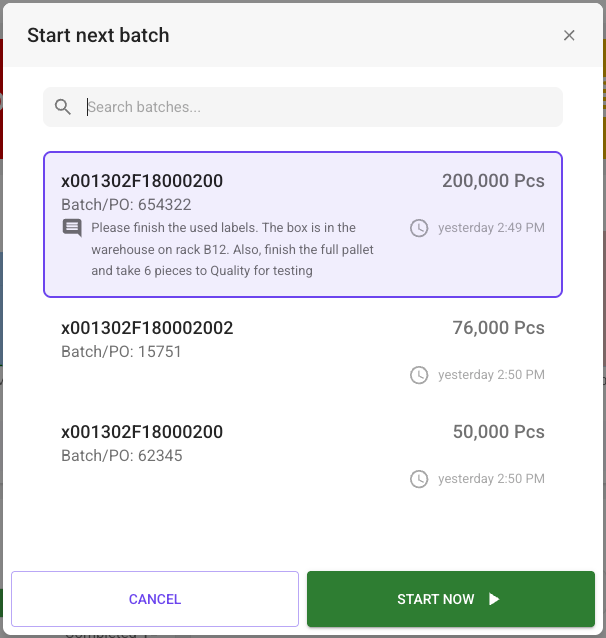
- Batch comments are now visible in the Operator View. Users can view comments for the running batch by clicking the info icon on the batch card, and the comments also appear in the Next batch list dialog.
Improvements
- GraphQL API
- Documentation clarifies which type of ID is expected by
archivePeripheralandperipheralByID.
- Documentation clarifies which type of ID is expected by
- Other
- Added the ability to edit registration in the multi-select dialog in Operator View.
- Administration page: Moved the Add button to the bottom-right corner to prevent it from covering page navigation.
- Fixed a regression that caused peripherals without descriptions, when created through the API, to produce errors.
Bug fixes
- Organization Hierarchy: Fixed a bug where, after moving a Node to a Directory, the Node would disappear.
- Fixed a bug where the OEE card wasn't shown in the Operator View if no main OEE type was configured for the Line. The application now defaults to showing OEE1 if no main type is set.
- Fixed a bug where the hourly count displayed incorrect stop durations in some time zones.
- Fixed a bug where the Operator View and Batch tab displayed different values for batch ETC.
- Activities: Fixed a bug where the Batch filter remained stuck in the loading state after selecting a location.
- Fixed a bug where the
indicesargument was ignored fordevice.sensorsanddevice.peripheralsresolvers. - Fixed a bug in the Operator View where starting a batch would start the first batch in the list instead of the batch selected by the user.
For older updates:
contact us